



BluArmor C20 Mesh Intercom Review: The Best Motorcycle Comm System for Indian Riders
 Share

If you ride in a group, you already know the problem. The rider ahead points at a turn, the rider behind waves, and nobody can hear anybody over wind and engine noise. A good helmet intercom fixes that. The BluArmor C20 Mesh Intercom is built for riders who want reliable rider-to-rider calls, clear audio and a unit that can take monsoon rain and dust. This review covers what the C20 offers, how to mount and look after it, where it works best and who should choose something else.
Disclosure: RevvGearZ sells the BluArmor C20. Where a different setup suits you better, we say so.

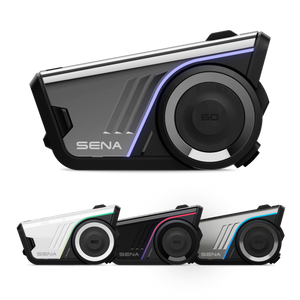
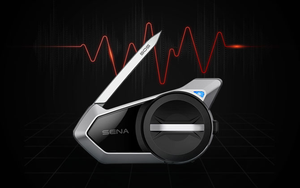
C20 Mesh Intercom | BluArmor
Helmet mesh intercom for group rides
₹9,999
In stock: 5 units
Order Genuine Part at RevvGearZ - Fast India Delivery
Stock count taken 15 October 2026. Check the live product page before ordering.
What the C20 offers, as listed
These are the features on the product listing. Where a figure is the manufacturer's, we say so, because real-world results depend on your helmet, your group and the road.
- RIDEGRID Lite™ mesh intercom for rider-to-rider communication that reconnects automatically
- Pulse by BLU™ HD audio with two-level wind noise filtering
- Music sharing through Buddy Connect, so one rider can share a playlist with the group
- Three-button modular interface, designed to be used with gloves on
- ClickDock mounting behind the helmet to keep the profile low
- 1.1 km line-of-sight range (manufacturer figure)
- IP67 water and dust resistance rating
- 16+ hours of battery life (manufacturer figure)
- Over-the-air firmware updates and 360° app control
Real-world scenarios: where mesh earns its keep
City stop-and-go
In slow traffic the bike is quiet enough for a short call, but the real value is in the signal you do not have to shout over. Riders in a city group can call a stop, a lane change or a fuel stop without a hand leaving the bars. Keep the call short and let the other riders reply with the three-button controls, so nobody swerves while looking at a phone.
Monsoon highway
Heavy rain, spray from trucks and water on the carriageway are where sealing matters. IP67 means the unit is built to handle rain and dust. It does not mean it should sit submerged. After a wet day, dry the helmet and the unit before you charge it, and keep the charging port cover closed.
Ladakh and Spiti
On long mountain stretches, a mesh link is useful when the group spreads out over a few hundred metres at a river crossing or a hairpin. Cold weather drains lithium batteries faster, so charge to full before a high-altitude day and carry a cable and a power bank. Gloves are thicker at altitude, so practise the three buttons at a stop before you leave.
Trail and gravel
Off-road, the unit's low profile and sealed build help, but a helmet that moves on bumps changes the audio more than any filter setting. Snug the helmet fit and make sure the speaker sits properly against the ear. Expect the mic to pick up more wind on a fast gravel descent.

Before you buy: a practical checklist
- Helmet fit and mount room. ClickDock sits behind the helmet. Check there is room for the mount and that the speaker pads sit flat against your ear with the helmet on.
- Riding style. Group riders benefit most from mesh. Solo riders who only want music may find a simpler unit enough.
- Battery for the trip. 16+ hours covers most weekends and many multi-day tours on one charge. Carry a cable on longer trips.
- Weather sealing. IP67 handles rain and dust well. Treat it as protection against weather, not against submersion.
- Gloves. Test the three buttons with the gloves you actually ride in.
Installation and mounting walkthrough
Most riders can mount the C20 in under 30 minutes. Work on a clean surface, and keep the helmet off your head so you can see the shell clearly.
Tools and parts
- The mount and adhesive pads supplied with the unit
- Isopropyl alcohol and a lint-free cloth for cleaning the shell
- Your helmet, its liner removed if the speaker pocket sits under it
- A USB cable and a charged phone for pairing and firmware checks
Procedure
- Charge the unit fully before fitting. Fitting a flat unit makes it harder to check the pairing.
- Clean the mounting area on the helmet shell with isopropyl alcohol and let it dry. Oils from your hands or sunscreen weaken adhesive.
- Check the position behind the helmet. Hold the unit where it will sit and check that it does not touch your neck, the helmet's chin strap or the rear ventilation.
- Apply the adhesive pad and press firmly for the time the adhesive instructions give. Do not reposition a pad repeatedly, because each removal weakens the bond.
- Route the speaker and mic leads under the liner, away from the chin strap and the rider's ears. Keep the mic boom close to the mouth without touching the lips.
- Pair the unit with your phone and the app, then run a test call at a standstill with the helmet on.
- Check for firmware updates in the app before your first ride, and install them while the unit is charged.
Battery care and long-term preservation
Intercom batteries are lithium-based, and most of their lifespan is lost to heat and deep discharge rather than to use. These are general lithium-battery habits, not a warranty instruction, so check the manufacturer's guidance for your unit.
- Avoid heat. Do not leave the helmet in a hot car or in direct sun on a tank bag. Heat is the fastest way to shorten battery life.
- Avoid running flat. Recharge once the unit drops to a low level. Repeated deep discharges reduce capacity over time.
- Store at partial charge. For long storage, store the unit at around half charge in a cool, dry place, and top it up every few months.
- Use a proper charger. Use the supplied cable or a certified equivalent, and do not charge while the unit is wet.
- Keep the port clean. Dust and grit in the charging port stop the contacts seating. Clear it with a dry brush.
Cleaning and weatherproofing care
Wipe the unit with a dry or lightly damp cloth after dusty rides. Do not use solvents, petrol or abrasive cleaners on the housing or the button surfaces. Dry the unit fully after rain before it goes back on the helmet. Check the rubber seals around the buttons and the port cover for cracks or grit every few months, and replace the cover if it no longer closes flush.
Comparison: BluArmor C20 vs Sena 50S vs Cardo Packtalk Edge
These three are the names most riders compare. We have not pulled competitor spec sheets for this table, so the rows below cover what each unit is generally known for and what to verify on the maker's page before you decide. Check current battery, range and price figures directly with each brand.
| Factor | BluArmor C20 Mesh | Sena 50S | Cardo Packtalk Edge |
|---|---|---|---|
| Core job | Mesh group intercom with music sharing | Premium mesh-capable intercom | Premium intercom with a strong group-calling focus |
| Weather rating | IP67 (listing) | Verify on maker page | Verify on maker page |
| Battery (manufacturer) | 16+ hours (listing) | Verify on maker page | Verify on maker page |
| Firmware and app | Over-the-air updates, 360° app control | Check current app and update policy | Check current app and update policy |
| Controls | Three buttons, glove-friendly | Check control layout for your gloves | Check control layout for your gloves |
| Typical price tier | ₹9,999 at RevvGearZ | Premium tier | Premium tier |
| Best for | Riders who want mesh and music at a mid-premium price | Riders who want a premium, well-supported ecosystem | Riders who want a premium group intercom and value the brand ecosystem |
The honest read: if your priority is group mesh calls, music sharing and a sealed unit at a more accessible price, the C20 is a strong choice. If you need a specific feature set, such as a particular Bluetooth profile or a longer rated range, check that spec on the maker's page against your riding before you buy.
Who should buy the C20 Mesh
- Riders who regularly go out in groups of three or more
- Touring riders who need reliable comms and music on long highway days
- Anyone who wants weather-sealed electronics for monsoon and dusty conditions
Who should skip it: solo riders who never use comms, and riders who will not charge the unit between trips.
Frequently asked questions
Does the C20 work with any helmet?
It mounts behind the helmet with ClickDock. Check the mount fit and the speaker pocket on your helmet before ordering, because shell shapes vary.
Can I update the firmware?
Yes. The C20 supports over-the-air firmware updates and 360° app control. Update while the unit is charged and before a long trip.
How long does the battery last?
The manufacturer lists 16+ hours. Real life depends on volume, music use and how often the mesh is active. Cold weather and heavy use both cut it down.
Is the C20 waterproof?
The listing gives an IP67 rating, meaning protection against dust and temporary immersion under defined conditions. Rain is fine. Do not leave it submerged, and do not charge it while wet.
Can I use it with gloves?
The three-button interface is designed for gloved use. Practise the controls at a standstill with your riding gloves before a group ride.
How do I keep the battery healthy?
Avoid heat, avoid running flat, store at around half charge for long periods and top up every few months. Use the supplied or a certified charger.
More guides from RevvGearZ
Ride connected. Order the BluArmor C20 Mesh Intercom at RevvGearZ, or see all motorcycle intercoms.